Last updated on November 11th, 2022 at 12:37 pm
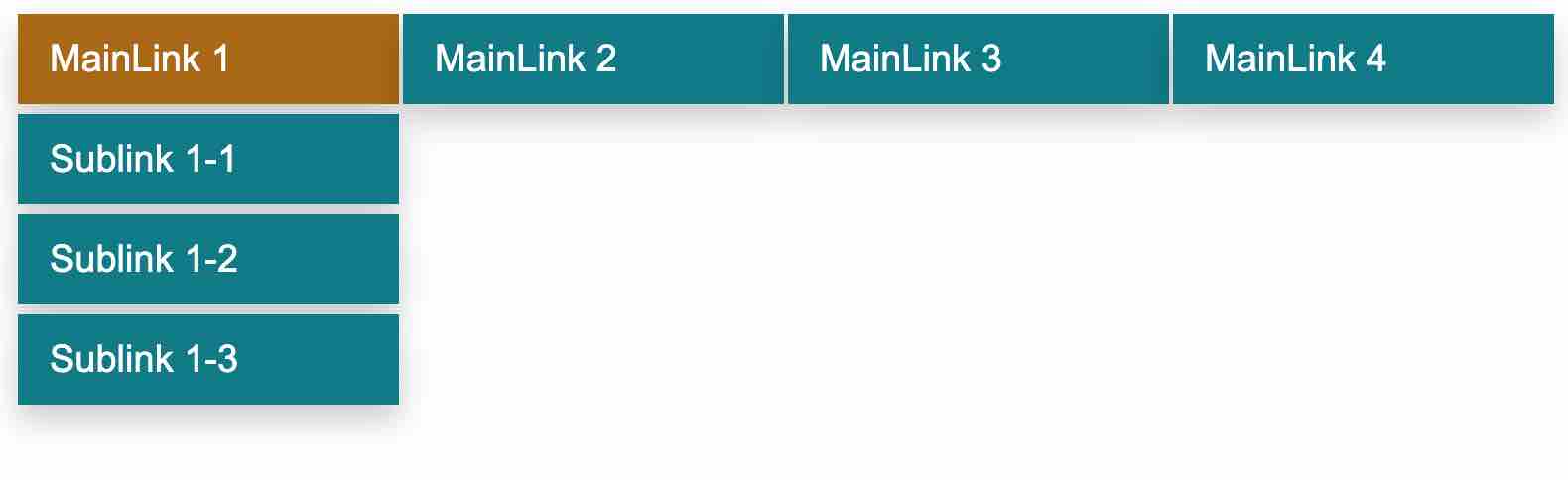
In this tutorial we are going to focus on creating a dropdown menu for your website without much complexity. Just using basic HTML attributes along with some CSS to style the menu. All we have to implement is the dropdown logic using CSS display:block . Check it out.
The CSS Code
This is the main part of the script (CSS) which gives the menu dropdown structure. Without this CSS, all you will see is plain HTML only output with some hyper links. Styling is given only for <ul> and <li> tags. Class name is dropdown.
Filename: dropdown.css
ul.dropdown{
margin:0;
padding:0;
list-style:none;
float:left;
width:100%;
}
.dropdown li{
margin:0;
padding:0;
float:left;
position:relative;
}
.dropdown ul{
display:none;
float:none;
margin:0;
padding:0;
list-style:none;
}
.dropdownli li{
float:none;
display:inline;
white-space:nowrap;
}

.dropdown li:hover ul{
position:absolute;
display:block;
}

.dropdown a{
display:block;
padding:12px 16px;
margin:1px 1px 4px;
font-family: Arial, Helvetica,sans-serif;
font-size:19px;
background:#007b88;
color:#fff;
text-decoration:none;
min-width: 160px;
box-shadow: 0px 8px 16px 0px rgba(0,0,0,0.2);
}

.dropdown a:hover{
background:#aa6800;
}
The HTML
Finally, here is the mail HTML code inside file named menu.html, that combine all these scripts together.
Filename: MainPage.html
<html xmlns="http://www.w3.org/1999/xhtml">
<head>
<title>CSS Dropdown</title>
<link rel="stylesheet" type="text/css" href="dropdown.css"/>
</head>
<body>
<ul class="dropdown" id="dropdown">
 <li><a href="#">MainLink 1</a>
 <ul>
  <li><a href="#">Sublink 1-1</a></li>
  <li><a href="#">Sublink 1-2</a></li>
  <li><a href="#">Sublink 1-3</a></li>
 </ul>
 </li>
 <li><a href="#">MainLink 2</a>
 <ul>
  <li><a href="#">Sublink 2-1</a></li>
  <li><a href="#">Sublink 2-2 lipsum</a></li>
  <li><a href="#">Sublink 2-3</a></li>
  <li><a href="#">Sublink 2-4</a></li>
 </ul>
 </li>
 <li><a href="#">MainLink 3</a></li>
<li><a href="#">MainLink 4</a>
 <ul>
  <li><a href="#">Sublink 2-1</a></li>
  <li><a href="#">Sublink 2-2</a></li>
 </ul>
 </li>
</ul>
</body>
</html>
As you can see we are calling the CSS file in this
<link rel="stylesheet" type="text/css" href="dropdown.css"/>
The Internet Explorer Javascript Hack (If required)
Hey! Didn’t I say CSS? Why do I need Javascript? Well, if the guys in Microsoft just followed CSS standards properly then we won’t need to put this javascript. Yes, this is here because we don’t want to make those IE(Internet Explorer) users feel left out.
Filename: dropdown.js
varliHover =function(){
varliEls = document.getElementById("dropdown").getElementsByTagName("LI");
for(vari =0; i < liEls.length; i++){
 liEls[i].onmouseover=function(){
 this.className+=" lihover";
}
 liEls[i].onmouseout=function(){
 this.className=this.className.replace(newRegExp(" lihover\\b"),"");
}
}
}
if(window.attachEvent)window.attachEvent("onload", liHover);
If you are creating this javascript file then add the below code to the menu.html file to call it or just put the javascript directly within <script></script> tag inside the html file.
<script language="javascript" src="dropdown.js"></script>
 admin
admin